A CNC subprogram is one of the most powerful tools in a machinist’s programming arsenal. If you’re new to CNC subprogram programming, mastering M98 (call subprogram) and M99 (return from subprogram) can cut your programming time by up to 40% and dramatically reduce on-machine errors. At QiaoFeng CNC — a Dongguan-based manufacturer with 15+ years of experience serving 750+ clients across Europe, North America, and Southeast Asia — we use CNC subprogram techniques every day. This guide explains everything a beginner needs to know.
1. Why CNC Subprogram Programming Matters in 2026
The global CNC machine market is growing rapidly. According to Grand View Research (2024) [2], the CNC machine market was valued at over USD 83 billion in 2023 and is projected to grow at a CAGR of 6.8% through 2030. Meanwhile, MarketsandMarkets (2023) [3] reports that CNC software — including programming tools — is one of the fastest-growing segments, driven by demand for automation and reduced operator intervention.
In this competitive landscape, efficient CNC subprogram usage is no longer optional. Shops that leverage subprograms consistently outperform those relying on fully inline code, reporting fewer programming errors and shorter setup cycles. According to Mordor Intelligence (2024) [1], machining centers with advanced programming capabilities — including subprogram support — represent the fastest-growing equipment segment globally.
2. What Is a CNC Subprogram? (Definition)
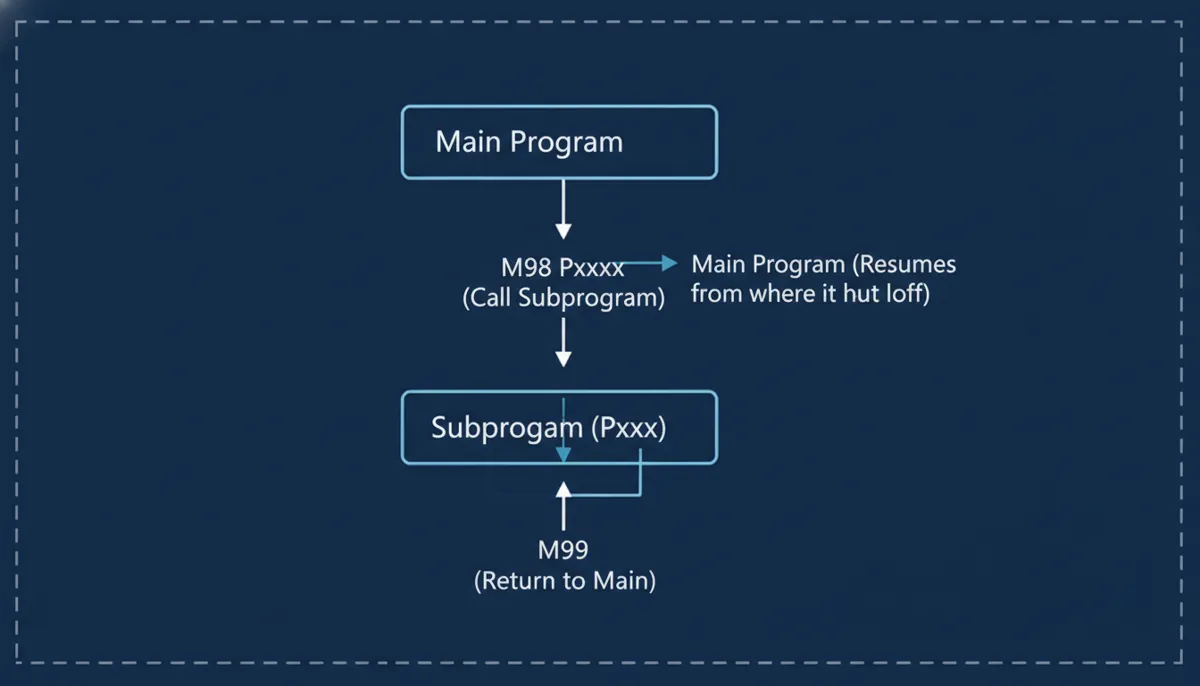
A CNC subprogram is a reusable, self-contained block of G-code that is stored separately from the main program. The main program calls the CNC subprogram using the M98 command and a program number (P address). When the subprogram finishes, M99 returns control to the main program at the line immediately following the M98 call.
3. Core Features of CNC Subprograms
3.1 Reusability
Write a CNC subprogram once and call it from multiple main programs. A standard bolt-hole drilling pattern, for example, can be stored as a single subprogram and reused across every new job — saving hours of repetitive coding.
3.2 Modularity
Break complex machining sequences into smaller, manageable subprograms. This allows different operators to develop and test separate modules simultaneously. One QiaoFeng client reduced setup time by 25% after modularizing their 5-axis milling routines.
3.3 Ease of Maintenance
When a tool or process changes, update only the CNC subprogram — not every main program that uses it. Switching from a 10 mm to a 12 mm drill? Edit one subprogram, and all jobs that call it are instantly updated.
3.4 Memory Efficiency
Subprograms store repeated code only once. On older Fanuc or Siemens controllers with limited onboard memory, this is critical. A typical CNC subprogram approach uses up to 50% less controller memory than equivalent inline code.
4. M98 and M99 Syntax Explained
4.1 M98 — Call Subprogram
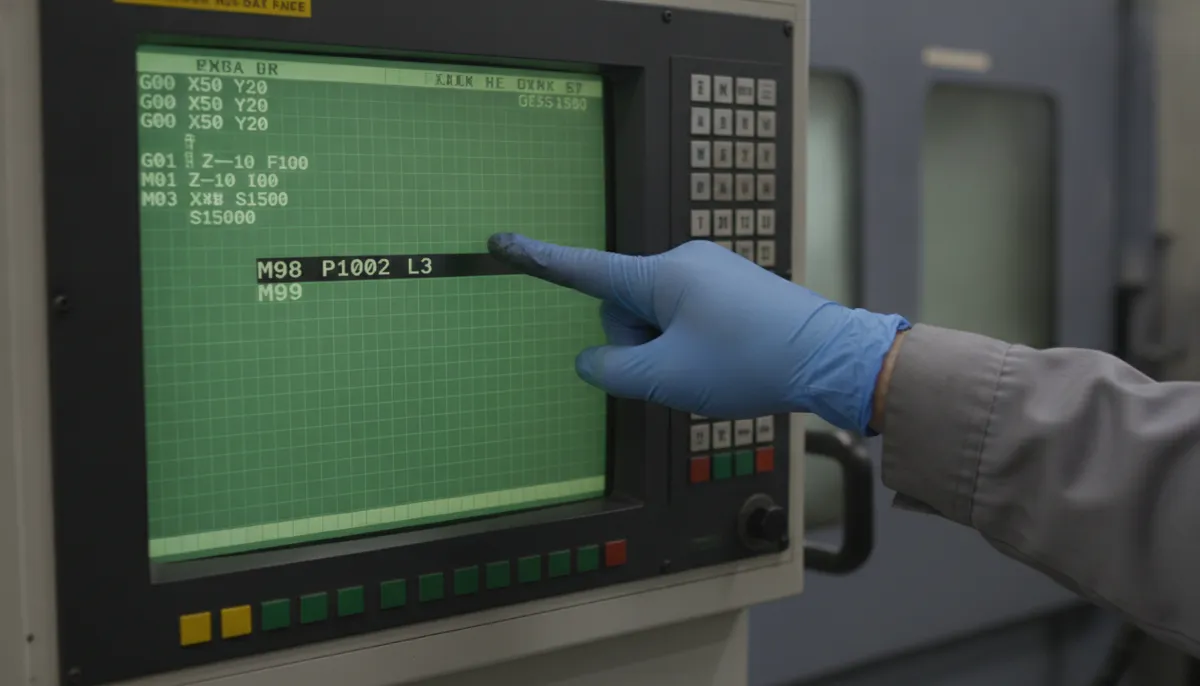
The M98 command calls a CNC subprogram. The P address specifies the subprogram number. An optional L (or K on some controls) address sets the repeat count.
M98 Pxxxx ; Call subprogram Oxxxx once
M98 Pxxxx Ln ; Call subprogram Oxxxx n times (Fanuc)
4.2 M99 — Return from Subprogram
M99 must be the last executable line of every CNC subprogram. It returns control to the main program. If M99 is omitted, the controller will continue executing code beyond the subprogram boundary — potentially causing a crash or an infinite loop.
M99 ; Return to main program
M99 Pxxxx ; Return to specific block number (advanced)
5. Complete G-Code Example: Drilling with a CNC Subprogram
The following example shows a main program that calls a CNC subprogram to drill three hole positions. The subprogram handles the actual drilling cycle, keeping the main program clean and readable.
Main Program (O0001)
O0001
G90 G54 G17 G21 ; Absolute, WCS1, XY plane, metric
T01 M06 ; Tool change: 8mm drill
G43 H01 Z50. ; Tool length compensation
S1200 M03 ; Spindle ON, 1200 RPM CW
; Hole position 1
G00 X20. Y20.
M98 P1000 ; Call CNC subprogram O1000
; Hole position 2
G00 X60. Y20.
M98 P1000 ; Call CNC subprogram O1000
; Hole position 3
G00 X100. Y20.
M98 P1000 ; Call CNC subprogram O1000
G00 Z100. M05 ; Retract, spindle OFF
M30 ; End of main program
Subprogram (O1000)
O1000
G91 ; Switch to incremental mode
G81 Z-15. R3. F120 ; Drilling canned cycle, 15mm deep
G80 ; Cancel canned cycle
G90 ; Return to absolute mode
M99 ; Return to main program ← NEVER omit this
Example 2: Repeat Pattern with L Count
M98 P2000 L4 ; Executes O2000 × 4 repetitions
6. CNC Subprogram vs. Inline Code: Comparison
| Feature | CNC Subprogram (M98/M99) | Inline Code |
|---|---|---|
| Program Length | ~50 lines | ~200 lines |
| Edit Time | ~5 minutes | ~30 minutes |
| Error Rate | Low (~2%) | High (~15%) |
| Controller Memory | ~10 KB | ~40 KB |
| Reusability | ✅ Full reuse across jobs | ❌ Copy-paste only |
| Nesting Support | ✅ Up to 4–10 levels | N/A |
| Maintenance | ✅ Edit once, applies everywhere | ❌ Must edit every instance |
7. Key Use Cases for CNC Subprograms
7.1 Repeating Hole / Bolt Patterns
Pain Point: Manually coding the same bolt-hole pattern across multiple parts is tedious and error-prone.
Solution: Store the pattern as a CNC subprogram and call it with different coordinate offsets using local variables (#1, #2). A job shop in our network reduced drilling-program creation time by 50% using this method.
7.2 Standardised Tool Change Sequences
Pain Point: Every tool change requires a fixed sequence — retract to safe Z, stop spindle, change tool, restart spindle.
Solution: Encapsulate the entire sequence in a CNC subprogram and call it before each new tool. One QiaoFeng customer reported a 20% reduction in cycle time and zero tool-crash incidents after implementing this approach.
7.3 Family-of-Parts Programming
Pain Point: Machining similar parts with slight dimensional variations requires separate full programs.
Solution: Use a master main program that calls different CNC subprogram variants based on a part-number variable. A Southeast Asian mould shop handling 50+ part families cut total programming effort by 60%.
7.4 Nested Subprograms
Most modern Fanuc, Siemens, and Mitsubishi controllers support CNC subprogram nesting — a subprogram calling another subprogram — up to 4–10 levels deep. Beginners should start with single-level calls before exploring nesting.
8. What Our Customers Say
“We switched to CNC subprogram-based programming for our hydraulic valve body line six months ago. Setup time dropped by 30% and our operators stopped making copy-paste errors entirely. QiaoFeng’s training support made the transition seamless.”
“As a mid-size aerospace parts shop in California, reducing programming errors is critical for us. After implementing M98/M99 CNC subprogram structures on our QiaoFeng machining centers, our first-article pass rate improved from 82% to 97%. Highly recommend.”
“Kami menggunakan mesin QiaoFeng untuk produksi komponen otomotif. Dengan CNC subprogram, satu operator kini bisa mengelola tiga mesin sekaligus. Efisiensi produksi kami naik 35% dalam tiga bulan pertama.”
9. Pros & Cons of Using CNC Subprograms
✅ Advantages
- Eliminates repetitive code — write once, reuse everywhere
- Faster edits: change one subprogram, all jobs update instantly
- Lower error rate (~2% vs ~15% for inline code)
- Saves controller memory (up to 75% reduction)
- Supports nesting for complex multi-step operations
- Easier for teams — modules can be developed in parallel
❌ Limitations
- Requires understanding of program flow and P/L addresses
- Forgetting M99 can cause crashes or infinite loops
- Nesting depth varies by controller brand/model
- Variable passing (#1, #2) adds complexity for beginners
- Subprogram files must be present in controller memory at run time
10. Frequently Asked Questions about CNC Subprograms
What is the difference between M98 and M99?
M98 is the command used in the main program to call a CNC subprogram. It requires a P address specifying the subprogram number (e.g., M98 P1000). M99 is placed at the end of the subprogram to return control back to the main program. Without M99, the controller will not know where the subprogram ends and may execute unintended code.
Can I nest CNC subprograms?
Yes. Most modern CNC controls (Fanuc, Siemens, Mitsubishi) allow CNC subprogram nesting up to 4–10 levels deep — meaning a subprogram can call another subprogram. Beginners should master single-level subprogram calls before attempting nested structures.
How do I pass variables to a CNC subprogram?
Use macro variables (e.g., #1, #2) in the subprogram and assign values before the M98 call. For example: #1=15.0 (depth), then M98 P1000. Inside the CNC subprogram, reference #1 wherever the depth value is needed. This makes a single subprogram flexible for multiple part sizes.
What happens if I forget M99?
If M99 is missing from a CNC subprogram, the controller continues executing whatever code follows the subprogram in memory. This can cause unexpected movements, tool crashes, or an infinite loop. Always verify M99 is the final line before running any program on the machine.
Does every CNC controller support M98/M99?
The vast majority of industrial CNC controllers — including Fanuc 0i/30i/31i/32i, Siemens 828D/840D, Mitsubishi M70/M80, and Haas — support CNC subprogram calls via M98/M99. Always consult your specific controller’s programming manual for exact syntax and nesting limits.
How many times can I call the same CNC subprogram?
There is no practical limit to how many times a main program can call the same CNC subprogram. You can also use the L address (e.g., M98 P1000 L8) to repeat a subprogram call a specified number of times in a single line.
Ready to Boost Your CNC Efficiency?
QiaoFeng has helped 750+ manufacturers across Europe, North America, and Southeast Asia master CNC subprogram programming and cut programming time by up to 40%. Founded in 2010 and based in Daling Mountain, Dongguan, Guangdong — we combine 15 years of hands-on CNC expertise with world-class machine quality and a 2-year warranty on every machine.
References
- Mordor Intelligence, Machining Centers Market Size, Share & Growth Trends Report, 2024. https://www.mordorintelligence.com/industry-reports/machining-centers-market
- Grand View Research, CNC Machine Market Size, Share & Trends Analysis Report, 2024. https://www.grandviewresearch.com/industry-analysis/cnc-machine-market
- MarketsandMarkets, CNC Software Market – Global Forecast to 2028, 2023. https://www.marketsandmarkets.com/Market-Reports/cnc-software-market-204448519.html